Filming a kayaking adventure on a 360 camera
A 360 camera on a kayak solves the hardest problem in paddling video — nobody can film you — and creates one new one: every clip needs reframing.
Part of Filming.
We earn a commission if you buy through our links, at no extra cost to you. It never changes what we recommend or the order we rank it in — how this works.

Mount a 360 camera on a pole, not on the deck, and shoot in short clips you plan to reframe afterwards. A 360 camera records the entire sphere, so the stick holding it is erased from the finished shot and the camera appears to hover a meter from the boat — the third-person adventure shot that is otherwise impossible without a second kayak. The workflow is: pole on, one clip per thing that happens, then a reframing pass where you keyframe the angle for each clip and export flat video. Budget the reframing time honestly — it is a few minutes per clip, and it is the single reason people abandon the format. Insta360 publishes IP68 to 49ft (15m) for the X5 and user-replaceable lenses, which is what makes it the body we would take on water.
01
How to film a kayaking adventure video on a 360 camera
- 01
Fit the pole and leash it
Screw the camera to an invisible selfie stick and tie the pole to the boat or your PFD. A 360 camera on a pole over water with no leash is a camera you will eventually watch sink.
- 02
Set the resolution one step below maximum
The highest 360 mode fills cards and batteries fast and the finished flat export is a crop of it anyway. A mid setting gives you the whole day instead of ninety minutes.
- 03
Shoot one clip per event, not one clip per hour
Start recording when something is happening and stop when it ends. Long files are the reason 360 footage never gets edited.
- 04
Hold the pole out and slightly back
Extended to about a meter, angled behind your shoulder, so the frame contains you, the hull, the paddle and the shoreline. Pointing is unnecessary — the camera sees everything.
- 05
Wipe both lenses between clips
A 360 camera has glass on both sides and one droplet ruins a whole sphere. Carry a microfiber cloth inside your dry bag, not in a pocket.
- 06
Reframe at home, one clip at a time
In the app, set keyframes for where the viewer should look, then export flat video. Do it the same evening while you still remember what each clip was.
Why 360 suits paddling specifically
Kayaking breaks flat cameras for one structural reason: there is nobody to operate the camera. Your hands are on a paddle, you cannot look at a screen, and anything you mount to the deck has to be aimed before you launch — at which point the camera films whatever is in front of it, which on a paddle is usually a lot of water and a knee.
A 360 camera removes aiming from the job entirely. It captures the whole sphere and you decide where the viewer looks afterwards, which means the heron that lifted off behind you is in the footage, the rapid you looked back at is in the footage, and so is your own face at the moment it got interesting. On water, where you only get one take of everything, that is worth more than resolution.
The trade is explicit and worth stating before anyone spends money: 360 camera vs action camera lays it out, and the short version is that every clip carries an editing tax a flat camera does not.
Where the camera goes
| Position | What you get | Watch out for |
|---|---|---|
| Handheld pole, extended behind the shoulder | The floating third-person shot — the reason to own the format | A hand off the paddle; leash it and use it on calm water |
| Pole wedged into a deck fitting or between bungees | The same shot hands-free, slightly lower | Vibration and slow rotation; check it every few minutes |
| Short mount on the foredeck | Bow wave, horizon and your upper body | Spray on the lens, and the hull fills a third of the sphere |
| Mounted behind the seat | Paddle strokes and wake, good for an edit's B-roll | You are the subject whether you like it or not |
The pole position is the one that matters. Extended to roughly a meter and held out and back, the stick falls into the camera's blind spot between the two lenses and disappears from the finished frame. What survives is the boat, the paddler, the paddle and the landscape from an angle that looks like a drone shot and costs nothing in airspace permission. The paddle and pole mount options cover the hands-free fittings if a hand off the paddle is not an option where you paddle.
The four shots an adventure edit needs
Adventure video that people watch is not one long clip — it is four kinds of shot, cut together. A 360 camera can produce all four, and knowing which you are missing is what stops a two-hour paddle becoming forty seconds of usable footage.
The establishing shot. The boat small in a large landscape. Pole fully extended, angled up and away, reframed wide. This is the shot that tells the viewer where they are, and it is the one people forget.
The effort shot. Paddle entering water, hands, spray, breathing. Reframed in tight on the blade or the shoulder. Three seconds of this is worth a minute of scenery.
The reaction shot. Your own face when the rapid arrives or the wildlife appears. Only a 360 camera gets this reliably, because you were not pointing anything at yourself.
The reveal. Reframe from the bow forward to the shoreline opening up, in one move from a single clip. On a flat camera that requires two cameras or a pan you have to execute live; on a 360 camera it is two keyframes.
Settings for water, and the two that cause most problems
Resolution one step down from the maximum. The flat clip you export is a crop out of the sphere, and the difference between the top mode and the one below it is far smaller in the export than it is in the file size. Insta360 publishes about 88 minutes at 8K30 for the X5 against 185 minutes in Endurance mode at 5.7K24 — on a day paddle, that is the whole decision.
Horizon lock on. A kayak pitches and rolls constantly and 360 horizon lock is the one feature that makes the footage watchable without any work in the edit. Leave it on.
Lens guards fitted. Two exposed glass surfaces on a boat deck will meet a paddle blade, a dock or a rock. On the X5 the lenses themselves are user-replaceable, which is the single best answer to the format's worst failure mode; on the X4 they are not, so guards matter more.
Wind is the audio problem, and the mic is in the open. There is no sheltered microphone position on a pole. Expect to replace the audio or use a separate recorder for anything you narrate — how to cut wind noise has the five fixes in order of effect.
Before you launch, and after you land
Fit and leash everything on the beach. Check the pole is locked, the camera is screwed down hard, the card is in and the battery is full, and that the leash is short enough not to foul the paddle. A 360 camera on a pole is the easiest camera on this site to drop in deep water, and floats and tethers is twenty dollars against the whole rig.
Afterwards, rinse before anything dries — fresh water, door shut, and let the outside dry before you open it. Salt in the lens threads of a 360 camera is particularly unpleasant because both lenses are exposed. The routine is in salt water care and rinsing.
Then reframe that evening while you still remember what each clip was. Footage left unreframed for a month is footage nobody will ever see, and the finished edit comes together faster than people expect — editing a trip video people watch covers structure, and editing on a phone covers doing it all without a laptop.
02
The camera and the pole that does the work
The pole is not an accessory on a 360 camera — it is the reason the format exists, because the stick disappears from the footage and the camera appears to float beside the boat.
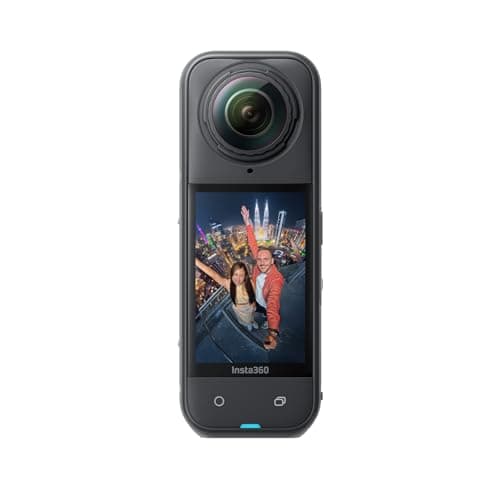
- IP68 to 49ft (15m)
- 2400mAh · ~88 min at 8K30
- User-replaceable
- 9.5
- 9.5
- 9.0
- 8.5
- 7.5
Insta360 X5
Insta360
15m rated, replaceable lenses, and the one camera that means you never have to aim while you are paddling.
Anyone filming themselves on the water who cannot stop to frame a shot
- 15m IP68 is the deepest bare rating of any camera on this site
- User-replaceable lenses — the single biggest fix for the 360 format's worst failure mode
- 185 minutes in Endurance mode at 5.7K24, which is a whole day of clips
- Invisible-selfie-stick reframing means you point the camera at nothing and pick the angle later
- Exposed lenses still scratch; lens guards are a purchase, not an option
- Every clip needs a reframing pass before anyone else can watch it
- 8K30 files are large and the edit is slower than flat footage
Specs from CineD, Insta360 X5 announcement with published specifications.
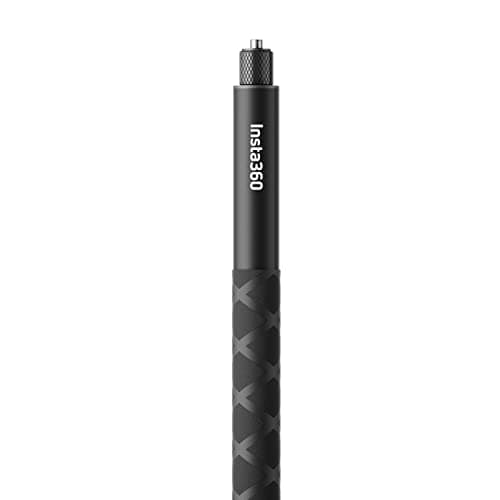
- 23.3cm to 114.1cm
- Aluminum
- 1/4-20 screw
- 6.5
- 9.0
- 7.0
- 9.0
- 7.0
Insta360 114cm Invisible Selfie Stick
Insta360
The pole that disappears in a 360 shot — the single accessory that makes a 360 camera worth owning on the water.
Third-person paddling shots from an X-series camera
- Vanishes from 360 footage, which is the whole reason the format works for self-filming
- Collapses to 23cm and stows in a deck bag
- Standard 1/4-20, so it takes more than just Insta360 cameras
- Light enough to hold out one-handed while the other hand paddles
- Insta360 says plainly it is not designed for high-speed adventures
- Aluminum sections seize if you put them away wet and salty
- It does not float, and a dropped pole with a camera on it sinks fast
Specs from Insta360 114cm Invisible Selfie Stick product page.
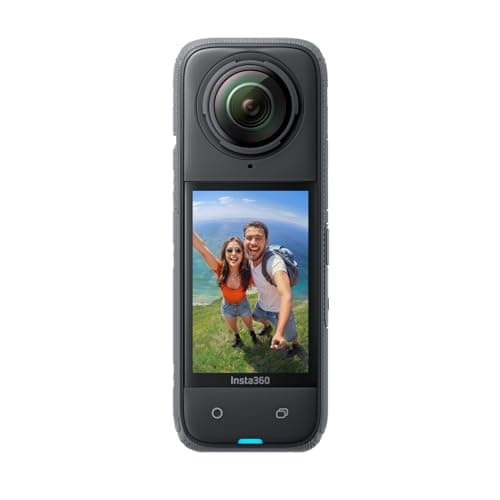
- 33ft (10m) / 50m with dive case
- 2290mAh · 135 min at 5.7K30
- 203g
- 8.5
- 9.0
- 8.5
- 8.5
- 7.5
Insta360 X4
Insta360
The previous X-series flagship: same 8K reframing trick, 10m rated, and usually a good deal less money.
A first 360 camera when the X5's deeper rating is not worth the difference
- 8K30 360 capture and the same invisible-selfie-stick effect as the X5
- Removable lens guards, so the lenses are protectable
- 135 minutes at 5.7K30 is a real day on the water
- Invisible Dive Case takes it to 50m when you need it
- 10m bare against the X5's 15m
- Lenses are not user-replaceable the way the X5's are — a deep scratch is a service job
- 203g on a pole is noticeable after an hour
Specs from Insta360 X4 published specifications.
03
How we picked
We do not lab-test, bench-test or dive-test cameras, and we do not own test units. What we do instead is read the manufacturer's published specifications, read the independent reviews that genuinely do test, read owner reports for the failure modes specs never mention — fogging, salt corrosion, cold battery collapse, mount slippage — and then weight all of it for 360 cameras used on lake and trail. Where a number is not published, the page says “not published” rather than filling the cell.
The full method, including what we refuse to do, is on the editorial policy page.
- 30%Water survival
- Exposed lenses change the rules — rated depth and lens-guard availability both count.
- 25%Reframing payoff
- A 360 camera is only worth it if the reframing genuinely saves shots you would have missed.
- 20%Battery in the cold
- Stitching two sensors costs power; cold costs more.
- 15%Mount ecosystem
- Invisible-selfie-stick geometry is the whole trick, and it depends on the mount.
- 10%Edit time
- Every 360 clip needs a pass before anyone can watch it.
04
Questions people actually ask
01Is a 360 camera good for kayaking?
Yes — it is the format's best use case, because nobody can film you while you paddle and a 360 camera removes aiming from the job. On a pole it produces a floating third-person shot of your own boat that a flat camera cannot get without a second paddler.
02How do you film yourself kayaking with a 360 camera?
On an invisible selfie stick, extended to about a meter and held out and slightly behind your shoulder. The pole falls in the camera's blind spot and disappears from the footage. Leash the pole to the boat before you launch.
03Do you have to reframe every 360 clip?
To share it as normal video, yes. The camera records a sphere and a flat export is a crop of it with keyframed angles. Apps offer automatic tracking that can do a rough job, but a clip you care about wants a human pass — budget a few minutes each.
04Which 360 camera is best for water?
The Insta360 X5 on published specifications: IP68 to 49ft (15m), the deepest bare rating of any camera we rank, plus user-replaceable lenses. The X4 is the cheaper route at 33ft (10m) bare, with lenses that are not user-replaceable. The ranking is in the best 360 camera for kayaking.
05What resolution should I shoot for a kayaking video?
One step below your camera's maximum. The flat export is a crop out of the sphere, so the top mode buys less finished detail than it costs in battery and card space — Insta360 publishes about 88 minutes at 8K30 for the X5 against 185 minutes in Endurance mode at 5.7K24.
05
Read this next
The best 360 camera for kayaking
Which body to buy before you worry about the workflow.
How to film yourself paddling
The same problem solved with a flat camera and a mount.
Insta360 X5 vs Ace Pro 2
360 against flat inside one brand, if you are still choosing a format.
Editing a trip video people watch
What to do with the clips once the reframing is done.
Floats, tethers and not losing your camera
A camera on a pole over deep water is the one that gets lost.
06
Sources
- CineD, Insta360 X5 announcement with published specifications
- Insta360 114cm Invisible Selfie Stick product page
- Insta360 X4 published specifications
Specifications are quoted from the manufacturer pages above as they read on the dates shown. Where a figure is not published, this site says so rather than estimating one. We have not tested these products.