Time lapse vs TimeWarp
One question decides this and it takes a second to answer: is the camera moving, or is it staying still?
Part of Filming.
We earn a commission if you buy through our links, at no extra cost to you. It never changes what we recommend or the order we rank it in — how this works.
Use TimeWarp when the camera is moving, and Time Lapse when it is not. TimeWarp is a stabilized time lapse — GoPro's hyperlapse mode — designed to be shot while you walk, paddle or ride, and it applies stabilization so the sped-up result is smooth instead of a seizure. Time Lapse is fixed-interval capture from a camera that stays put: a sunset, a cloud bank, a tent being pitched. DJI calls its moving version Hyperlapse and Insta360 calls its TimeShift; they are the same idea. Pick the wrong one and the symptom tells you immediately — a moving Time Lapse is unwatchably jerky, and a static TimeWarp is a Time Lapse with extra cropping for no benefit.
The two modes, properly
Both modes do the same basic thing: record far fewer frames than normal, then play them back at normal speed so time appears to run fast. Where they differ is what happens to the camera in between frames.
Time Lapse takes one frame every fixed interval — every half second, every two seconds, every thirty — and assembles them. Nothing stabilizes anything, because the assumption is that the camera has not moved between frames. On a tripod or a clamp, that assumption holds and the result is clean.
TimeWarp is the same capture with stabilization applied across the sequence, so that frames shot from a camera that moved between them still line up. It is built for a camera in motion and it is the mode that makes a walk up a hill into fifteen watchable seconds. The cost is a crop — the stabilizer needs margin at the edges of the frame to work with, so you lose some field of view.
| The shot | Mode | Why |
|---|---|---|
| Walking a trail | TimeWarp | The camera moves between frames; stabilization is the whole point |
| Paddling across a lake | TimeWarp | Same, plus the hull is pitching |
| Riding a gravel road | TimeWarp | Vibration between frames is severe |
| A sunset from a fixed point | Time Lapse | Nothing moves; no crop needed |
| Clouds over a lake, camera clamped | Time Lapse | Long interval, long duration |
| Packing or setting up camp | Time Lapse | Static camera, short interval |
| Stars | Night Lapse | Needs long exposures per frame, which neither other mode does |
| A busy harbour from a balcony | Time Lapse | Static, and the subject moves instead |
Picking the interval
This is where most time lapses go wrong, and the rule underneath it is simple: the interval should be short enough that the subject does not jump between frames, and long enough that the clip covers real time.
Our recommendations, which are editorial judgments rather than published specifications:
A fast-moving subject, static camera — 0.5 to 1 second. Traffic, people, a river. Longer than this and individual objects teleport between frames instead of moving.
A sunset or sunrise — 2 to 5 seconds. The light changes slowly and you want the whole event, which takes twenty to forty minutes.
Clouds — 5 to 10 seconds. Slower than people think. A ten-second interval over an hour gives you a usable clip of a whole weather system moving through.
Anything over an hour — 10 to 30 seconds. At this point battery and card are the constraint, and a long interval is what makes a multi-hour lapse possible at all.
TimeWarp, while moving — leave it on automatic speed if the camera offers it. The speed-up factor interacts with the stabilizer, and the automatic mode makes a better job of a changing pace than a fixed multiplier does. If you are setting it manually, a brisk walk looks right around 10x and a bike around 15x to 30x.
The two things that ruin both modes
Battery. Both modes keep the sensor and the processor working for the entire duration, even though they are writing far less data than video. A two-hour lapse is two hours of camera-on time, and no action camera battery does that — GoPro publishes 1.5 hours at 5.3K30 for the HERO13 Black, and a long lapse is in the same territory. For anything over about an hour you want external power, which on most current cameras means recording while charging from a power bank. That is its own subject: power on long days, and the hardware comparison is in batteries and power banks.
The camera moving when it should not. On a static Time Lapse, any movement at all shows up as a jolt in the finished clip, and there is no stabilization to absorb it. Wind on a lightweight tripod, a suction cup slowly releasing on a warm hull, somebody walking past a clamp on a dock rail. A mechanical mount with a solid grip is worth more here than anywhere else — suction cup and clamp mounts covers which hold and which creep.
Settings that matter, and settings that do not
Shoot the video version, not the photo version, unless you need the stills. Most cameras offer both Time Lapse Video (the camera assembles the clip for you) and Time Lapse Photo (you get the individual frames and assemble them yourself). The video version is finished when you stop. The photo version gives you far more control in an editor — you can change the speed afterwards, fix exposure drift, and crop — at the cost of needing to actually do that work.
Lock the exposure where you can, except at sunset. Auto-exposure adjusting between frames produces flicker, which is the most common fault in amateur time lapses. The exception is a sunset or sunrise, where the light genuinely changes by several stops and a locked exposure means the clip ends black.
4K is enough. Resolution is not the problem with a time lapse — stability and interval are. Higher resolutions cost you battery you need for duration.
Turn the rear screen off. It is the biggest single drain after the sensor and you are not watching it for two hours.
A card that can sustain it. A long lapse is a long sequential write, and a card too slow for the bitrate stops the recording by itself. V30 is the floor — the explanation is in SD card speed classes compared.
On the water specifically
A TimeWarp of a paddle is one of the best uses of an action camera there is, and two things make the difference between a good one and a wasted battery.
Put something in the foreground. Open water sped up is gray nothing. The bow of the boat, a paddle blade entering the water, your own shoulder — anything with a fixed relationship to the camera gives the viewer a reference and makes the motion read. The angles are in how to film yourself paddling.
Wipe the lens, then wipe it again. One droplet on the front element is present in every single frame of the finished clip, and a sped-up clip makes it look like a scratch. This is the most common reason a good lapse is unusable, and you will not notice until you are home. The rest of the wet settings advice is in best settings for water.
One more honest note: a TimeWarp from a kayak needs the mount to be solid, not approximately solid. Stabilization can fix the pitch of a hull; it cannot fix a mount that is slowly rotating. The deck options are in the best kayak camera mounts.
What the other brands call it
The naming is different and the modes are equivalent, which is worth knowing if you are switching ecosystems.
GoPro: TimeWarp for moving, Time Lapse for static, Night Lapse for stars.
DJI: Hyperlapse for moving, Timelapse for static.
Insta360: TimeShift for moving, TimeLapse for static.
The underlying question never changes — is the camera moving or not — and neither does the interval arithmetic.
01
What a long lapse actually needs
The camera, a spare battery because both modes run the sensor for a long time, and a card that can sustain it. In that order.
- 33ft (10m), no housing
- 1900mAh Enduro
- 1.5h at 5.3K30 / 2.5h at 1080p30
- 8.0
- 9.5
- 8.5
- 9.5
- 9.0
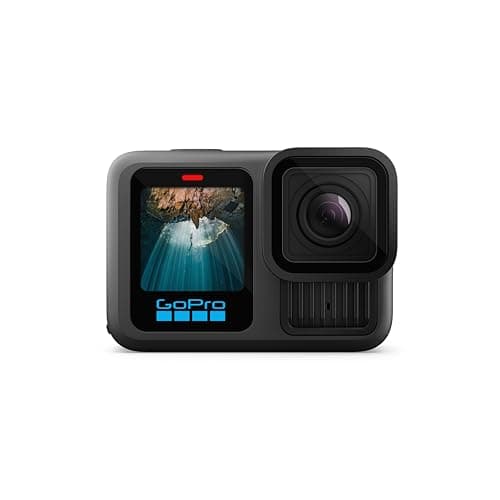
GoPro HERO13 Black
GoPro
The safest default for lake and trail: 33ft without a housing, the steadiest footage in the category, and a mount for literally everything.
Anyone who wants one camera to handle the kayak, the bike and the family trip
- HyperSmooth 6.0 with AutoBoost is the steadiest stabilization we can find published figures for
- Built-in mounting fingers plus 1/4-20 threads — it fits the GoPro ecosystem and a normal tripod
- Enduro battery is rated to keep full camera functionality down to 14°F (-10°C)
- Replaceable lens cover, so a scratched lens is a $20 problem and not a $400 one
- 33ft is shallower than the DJI and it is the shallowest of the three flagships
- Anything past 33ft needs the separate Protective Housing
- HB-Series lenses and ND filters are all extra purchases
Specs from GoPro HERO13 Black published specifications.

- 1900mAh
- Full functionality down to 14°F (-10°C)
- 1.5h at 5.3K30 / 2.5h at 1080p30
- 8.5
- 9.5
- 8.0
- 9.5
- 9.0
GoPro Enduro Battery (HERO13 Black)
GoPro
1900mAh, and GoPro publishes full camera functionality down to 14°F — the only battery claim on this page that names a temperature.
Cold-water days, and anyone who has watched a camera die at 40 minutes
- The published cold figure is the reason to buy this instead of a third-party cell
- Same runtime figures GoPro quotes for the camera itself
- Swappable in seconds, which a built-in battery never is
- Two spares is still cheaper than any power bank setup
- Only fits HERO13 Black and the MISSION 1 series — check before you buy
- Costs several times what an unbranded cell does
- Cold still shortens it; the rating is about functioning, not about full capacity
Specs from GoPro Enduro Battery (HERO13 Black) product page.
- U3 · V30 · A2 · Class 10
- Up to 190MB/s read, 130MB/s write
- Shock, temperature, water and X-ray proof
- 8.5
- 9.5
- 9.0
- 9.0
- 8.0
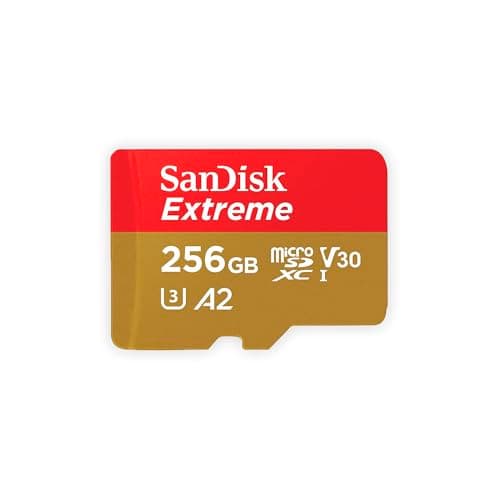
SanDisk Extreme microSDXC UHS-I
SanDisk
The card that appears on every manufacturer compatibility list, rated V30 and built to survive being wet, cold and dropped.
Anyone who does not want to think about cards again
- V30 guarantees a 30MB/s minimum sustained write, which is what high-bitrate video actually needs
- SanDisk publishes shockproof, temperature-proof, waterproof and X-ray-proof ratings
- Appears on GoPro, DJI and Insta360 tested-card lists more often than any other card
- Capacities up to 1TB, so a long trip does not need a card swap
- Write speeds vary by capacity — the 64GB tops out at 80MB/s write, the 128GB at 90MB/s
- Counterfeits are common; buy from a seller you trust
- V30 is the floor, not the ceiling — 8K on some cameras wants more headroom
Specs from SanDisk Extreme microSDXC UHS-I product page.
02
How we picked
We do not lab-test, bench-test or dive-test cameras, and we do not own test units. What we do instead is read the manufacturer's published specifications, read the independent reviews that genuinely do test, read owner reports for the failure modes specs never mention — fogging, salt corrosion, cold battery collapse, mount slippage — and then weight all of it for action cameras used on lake and trail. Where a number is not published, the page says “not published” rather than filling the cell.
The full method, including what we refuse to do, is on the editorial policy page.
- 30%Water survival
- Rated depth without a case, door design, and what the manufacturer actually publishes.
- 25%Stabilization in chop
- A kayak deck and a rooty trail shake in ways a handheld walk test never shows.
- 20%Battery in the cold
- Published runtime, spare-battery cost, and whether it charges while recording.
- 15%Mount ecosystem
- Finger mount, threaded, magnetic — and how much of it you have to re-buy.
- 10%Footage you will keep
- Lens replaceability, low-light behavior, and how much cutting the footage needs.
03
Questions people actually ask
01What is the difference between Time Lapse and TimeWarp?
TimeWarp is a stabilized time lapse meant to be shot while the camera is moving — walking, paddling, riding. Time Lapse is fixed-interval capture from a camera that stays still. Using the static mode while moving gives you a jerky, unwatchable clip.
02Which interval should I use for a time lapse?
Roughly 0.5-1 second for fast subjects with a static camera, 2-5 seconds for a sunset, 5-10 seconds for clouds, and 10-30 seconds for anything running over an hour. Remember that 30 captured frames is one second of finished video.
03Why does my time lapse flicker?
Almost always auto-exposure adjusting between frames. Lock the exposure for anything except a sunset or sunrise, where the light genuinely changes by several stops and a locked exposure would end in black.
04Can I shoot a long time lapse on battery alone?
Up to about an hour, depending on the camera. Both modes keep the sensor running for the whole duration, so anything longer wants external power — recording while charging from a power bank on cameras that support it.
05Should I use TimeWarp on a tripod?
No. The stabilization crops the frame to give itself margin, and on a static camera there is nothing to stabilize, so you pay the crop for no benefit. Use Time Lapse instead.
04
Read this next
The best settings for filming on water
Frame rate, white balance and the shutter question for wet conditions.
How to film yourself paddling
The angles that make a TimeWarp of a paddle worth watching.
Power on long days
Recording while charging, which is what a multi-hour lapse needs.
SD card speed classes, compared
Why a slow card stops a long lapse by itself.
Editing a trip video people watch
Where a ten-second lapse earns its place in a longer edit.
05
Sources
- GoPro HERO13 Black published specifications
- GoPro Enduro Battery (HERO13 Black) product page
- SanDisk Extreme microSDXC UHS-I product page
Specifications are quoted from the manufacturer pages above as they read on the dates shown. Where a figure is not published, this site says so rather than estimating one. We have not tested these products.